


To check Samsung mobile or cellphones IMEI (International Mobile Equipment Identity) | ||||
| On the main screen type *#06#
Information you get from the IMEI (International Mobile Equipment Identity) XXXXXX XX XXXXXX X TAC FAC SNR SP TAC = Type approval code of your samsung Mobile FAC = Final assembly code of your cellphone SNR = Serial number of your samsung Phone SP = Spare | ||||
| Other secret tricks for samsung mobile or cellphone | ||||
| If you have downloaded corrupted or incompatible Java midlets or other media,
which are causing problems with the phone, try this *2767*JAVA# Java Reset and (Deletes all Java Midlets) *2767*MEDIA# Reset Media (Deletes All Sounds and Pics) *2767*WAP# Wap Reset *2767*CUST# Reset Custom EEPR0M *2767*FULL# Reset Full EEPR0M (Caution) For example : *2767*JAVA# would be keyed in as *2767*5282# Note : Not all codes will work with SGH-C100. The master reset code is: #*7728# This will not delete anything from your mobile phone, but set each and eveything to its default/standard setting as it was on the time of purchase. To unlock your phone put a sim from another company, now type *#9998*3323# it will reset your phone. Push exit and then push 7, it will reset again. Put your other sim in and it will say sim lock, type in 00000000 then it should be unlocked. Type in *0141# then the green call batton and it's unlocked to all networks. This code may not work on the older phones and some of the newer phones. If it doesn't work you will have to reset your phone without a sim in it by typing *#2767*2878# or *#9998*3855# (not tested) Other Samsung Codes *#9998*4357# Help Menu *#9998*5282# Java menu (GRPS/CSD settings for JAVA server) *#9999#0# Monitor Mode *#9999# or *#9998*9999# Software Version *#8888# or *#9998*8888# Hardware Version *#9998*746# or *#9998*0746# or *#0746# Sim Infos *#9998*523# or *#9998*0523# or *#0523# Display Contrast *#9998*842# or *#9998*0842# or *#0842# Vibration On (until you push OK) *#9998*289# or *#9998*0289# or *#0289# Buzzer On (until you push OK) *#9998*288# or *#9998*0288# or *#0288# Battery & Field Infos *#9998*377# or *#9998*0377# Error log *#9998*778# or *#9998*0778# or *#0778# Sim Service table *#9998*782# show date and alarm clock *#8999*638# show network information *#9998*5646# change operator logo at startup *#9998*76# production number *#9998*968# view melody for alarm *#9998*585# Non-Volatile Memory (NVM) *#3243948# Digital Audio Interference Off *#32436837# Digital Audio Interference On
|
Monday, May 10, 2010
SAMSUNG MOBILE TIPS
LG MOBILE TIPS

To check LG mobile or cellphones IMEI (International Mobile Equipment Identity) | ||||
| On the main screen type *#06#
Information you get from the IMEI (International Mobile Equipment Identity) XXXXXX XX XXXXXX X TAC FAC SNR SP TAC = Type approval code of your LG Mobile FAC = Final assembly code of your cellphone SNR = Serial number of your LG Phone SP = Spare | ||||
| Other secret tricks for LG mobile or cellphone | ||||
| LG all models test mode:
Type 2945#*# on the main screen. 2945*#01*# Secret menu for LG IMEI and SW (LG 510): *#07# Software version (LG B1200): *8375# Recount cheksum (LG B1200): *6861# Factory test (B1200): #PWR 668 Simlock menu (LG B1200): 1945#*5101# Simlock menu (LG 510W, 5200): 2945#*5101# Simlock menu (LG 7020, 7010): 2945#*70001# Simlock menu (LG 500, 600): 2947#* LG-U81XX SPECIAL CODES Code to read phone version : - Phone without SIM - Enter 277634#*# or 47328545454# - Select 'SW Ver.info' Code to reset phone : - Phone without SIM - Enter 277634#*# or 47328545454# - Select 'Factory Reset' Code to enter UNLOCK MENU : - Phone wit SIM inside - Enter 2945#*88110# Test Menu 8330 : 637664#*# Test Menu 8180 V10a: 49857465454# Test Menu 8180 V11a: 492662464663# Test Menu 8130-8138: 47328545454# Test Menu 8110-8120: 277634#*
|
Friday, May 7, 2010
How to Remove Entering of Serial Key in Windows XP Setup
When you manually install Windows XP to several computers with different specifications. Instead of inputting the License Key in every computer, Make it Automatic Insert like OEM Installation Disc!
Tested in Windows XP Service Pack 2 and 3
[UserData]
[Data]
|
Tested in Windows XP Service Pack 1
[UserData]
[Data]
|
Open your notepad, copy-paste the settings above, input your Product Key and save it as Winnt.sif to I386 Folder of your Windows XP Installation Disc by creating an ISO image and editing the file using any ISO Editor.
Normal Mistake: Winnt.sif.txt, uncheck "Hide Extension for known file types" in Windows Explorer > Tools Menu > Folder Options > View Tab
Sorry... I can't find any Free ISO Editor for Windows. Please tell me If you find one :)
WORKAROUND:
Create a duplicate or a copy of your Windows XP Installer and do not finalize the burning of the disc. In short, make a multi-session disc.
Example using CDBurnerXP:
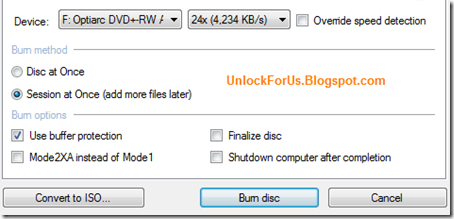
After creating a copy as multisession disc, Re-open CDBurnerXP and choose Data Disc > Open the drive and re-insert the disc for adding more files.
Adding winnt.sif to I386 Folder:
Continue Multisession Disc
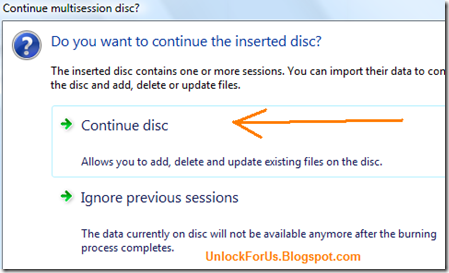
Drag the File to I386 Folder and Start Burning!
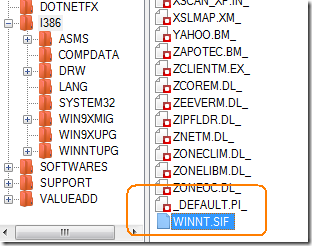
Tip: You can also put your must have Softwares in the Installation Disc. Great for Computer Technicians!
Creating a Windows XP Unattended Installer
This is an old guide but still very useful and deserve a descent update. I'm shock that many people still doesn't know about this small utility that can be found in their Windows XP Installer.
"Lawrence, It's almost two months now since you release the latest update of your software winbubble, do you have new releases coming soon? anyway, I have a question. How do I automate the installation of Windows XP? - Jared"
WinBubble is still in development and I'm still Shaping my skills. Surely, Everybody will benefit from my studies and Please stay tuned always. Thanks in advance.
Ok, Let's go back from the main topic. Open your Windows XP Installer and explore the following path: [Disc]SUPPORT\TOOLS

Note: I recommend to download the latest one for Windows XP Service Pack 3, Download here
According to Microsoft the latest deploy.cab supports:
| Windows XP; Windows XP Service Pack 1; Windows XP Service Pack 2; Windows XP Service Pack 3 |
1. Copy the file Deploy.cab to any directory and Extract the files...
2. Click the Useful utility setupmgr.exe and if your using Windows Vista Run the File as Administrator.
3. Follow the Pictures below:


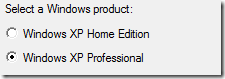
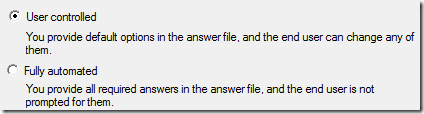

Now, you can enter your Name, Organization, Time Zone, Administrator Password, Display Settings, Product Key, Networking and other settings.
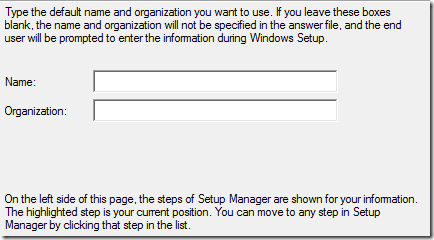
Note: In Windows Vista OS, Don't Set the Time Zone... Just proceed byClicking to the other options.
Go to the location where you save the file Unattended.txt andRename to WINNT.SIF and Place to I386 Folder of your Installer.
I made some Template if you don't want to use the software.
[Data] [Unattended] [GuiUnattended] [UserData] [Identification] [Networking] |
Save it as WINNT.SIF and place that to your Windows XP Installer directory I386.
Tips for creating strong passwords on Windows 7 (and Vista)

It can be made up of letters, numbers, especial symbols, and spaces.
Tips for creating a secure password
- Is at least eight characters long
- Does not contain your family name, user name, company name or any words relating to you
- Does not contain a complete word
- different from previous passwords
Contains characters from each of the following four categories:
Uppercase letters A, B, C
Lowercase letters a, b, c
Numbers 0, 1, 2, 3, 4, 5, 6, 7, 8, 9
Symbols found on the keyboard
\ - + ~ ! @ # $ % ^ & * ( ) _ = { } [ ] | : ; " ' < > , . ? / `
Create an easy-to-remember piece of information that can be use as a password that combines all the categories. Relate your password to a favorite hobby, foods or words.
Lower Case
facebook
f@c3800k
Upper Case
regdevelop
r3gd3v3l0p
Alternating Case
yesterday
Y3$73rD@y
There is a Web Application that I’ve made that easily change the words like the above example.
If you feel you must write down your password in order to remember the character combination, make sure you don't label it as your “secret” password, and keep it in a safe place. This time a random password generator is recommended.
Some people create an acronym from an easy-to-remember information of your personal information. For example, a phrase that is meaningful to you and its impossible for you to forget, such as My brothers birthday is 6 August, 1974. Using that phrase as your guide, you might use Mbbi6/Aug,74 for your password.
If your a kind of person that doesn’t wants to memorize complicated passwords and you want the plain and readable ones. This time, anencrypted password generator is recommended.
Encrypted password generator creates a balance between the unrecognizable secure passwords and easy-to-remember password ones.
From a very simple word like “hello” into a strong and encrypted words.
1. Use the tool to generate the secure password and memorize your suggested word only.
2. Before login to your online bank, mail, facebook, myspace, friendster or any social networking website, go to the Windows For Us Encrypted password Generator and use the tool to create your encrypted password.
You don't need to memorize the secure password because you can go back to the website and generate the secure password again then afterwards, use that for login.
Hope this helps!
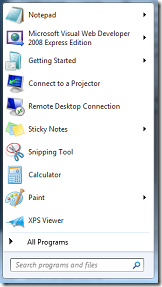
Display/Clear the Recent Programs in Windows 7 and Vista Start Menu
 This is one of the unique features of WinBubbles that enhances the usual clearing of recent program list in the Start Menu.
Same with Google in their Web Browser Google Chrome, the new version of WinBubbles aims to give “suggestions” on several features that Windows 7, Vista and the future version of Windows should have.
It’s also my interest to help users understand more about the world of computers we live today.
Windows 7 Settings
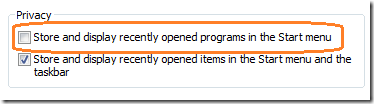
Vista Start Menu Settings
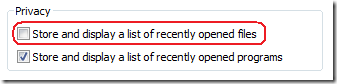
Using the new version of WinBubbles, you can clear these items and restore them back if you need them.
Clear the Icons

Re-Display the Program List
How to Get the Product Key in 64-Bit version of Windows 7
Many users believed in the negative feedback during the start of Vista campaign several years ago. We all know that the operating system has undergone a lot of changes and each changes needs adaption.
Unfortunately, many users wipe out the OS itself after buying a new Vista machine, replaces it with Windows XP and they forget to check if there’s a backup CD or copy of the product key.
Most of the manufacturers nowadays doesn’t give the installer of the OS.
Prevention is Better than Cure
Using the new version of WinGuggle, you can create a backup if you don’t have the original installation disc of your 64-bit version of Windows.
Just run the program and copy the product key for safe keeping.
Windows 7 64-Bit Enterprise Edition

Your antivirus program will not give any alarm and also works with 64-Bit version of Vista, Microsoft Office XP, 2003 and 2007!
Hope this helps!


